




Most Outdated Tech Tools: QuickBooks, Sage, Microsoft Dynamics – Risks and Updates

In the fast-paced world of business technology, some tools quickly become outdated. Software like QuickBooks, Sage, and Microsoft Dynamics has long been industry standards for accounting, ERP, and business management. However, using outdated versions of these tools can cause operational inefficiencies, security risks, and missed opportunities for automation and insights. Businesses relying on older software must understand the risks and consider updates to stay competitive.
Why Software Becomes Outdated
Technology evolves rapidly. Cloud computing, AI, real-time data analytics, and cybersecurity standards progress every year. Software that was cutting-edge five or ten years ago can quickly lag behind modern requirements. QuickBooks, Sage, and Microsoft Dynamics have continually released updates, yet many businesses continue using legacy versions. Outdated software often lacks new features, improved interfaces, and necessary security patches.
QuickBooks: Common Issues with Older Versions

QuickBooks remains a favorite among small and medium businesses for accounting and bookkeeping. However, older versions can have several drawbacks:
- Limited cloud integration: Older QuickBooks versions often lack cloud collaboration, making remote work difficult.
- Reduced security: Legacy versions may not have the latest encryption standards.
- Compatibility issues: Older QuickBooks may struggle with newer operating systems or third-party integrations.
Upgrading to the latest QuickBooks versions, or moving to QuickBooks Online, ensures access to modern features, mobile compatibility, and better security.
Sage: Challenges with Legacy ERP Systems
Sage offers a suite of ERP, accounting, and payroll solutions. Many organizations still use older Sage versions, which can lead to:
- Data silos: Older systems may not integrate well with modern CRM, HR, or analytics tools.
- Compliance risks: Taxation and reporting rules change; outdated Sage versions may not be up to date.
- Performance lag: Legacy Sage software can slow down with increasing data and transaction volumes.
Transitioning to Sage Cloud or the latest Sage ERP versions provides automated updates, integration capabilities, and improved scalability.
Microsoft Dynamics: Outdated Versions and Implications
Microsoft Dynamics is widely used for CRM and ERP purposes. Organizations using older Dynamics versions face issues such as:
- Lack of AI insights: Modern Dynamics versions include predictive analytics, AI recommendations, and business intelligence dashboards.
- Security vulnerabilities: Legacy versions may no longer receive critical security updates.
- Integration problems: Outdated Dynamics systems struggle to connect with Office 365, Power BI, and other Microsoft 365 tools.
Upgrading to Microsoft Dynamics 365 provides cloud access, AI-driven insights, and seamless integration with the Microsoft ecosystem.
Risks of Using Outdated Tech Tools
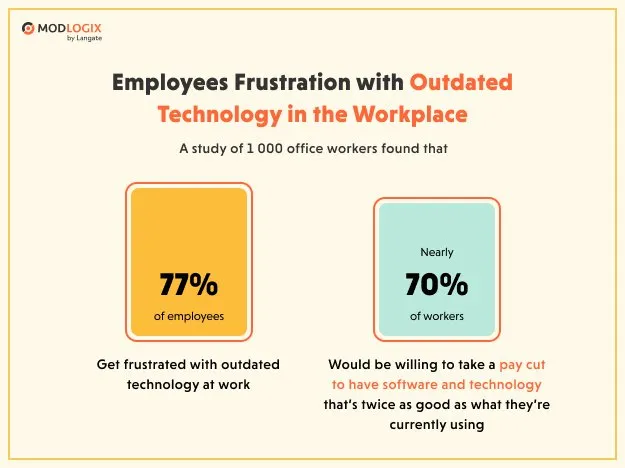
Using outdated software like older QuickBooks, Sage, or Dynamics versions can impact businesses in multiple ways:
- Security threats: Older tools are more susceptible to hacking, malware, and data breaches.
- Operational inefficiency: Lack of automation leads to more manual work and slower processing.
- Regulatory non-compliance: Outdated software may fail to comply with changing accounting, tax, and industry regulations.
- Reduced competitiveness: Businesses using old tools may miss out on features that improve customer engagement, analytics, and workflow optimization.
Benefits of Updating to Modern Versions

Upgrading to the latest versions of QuickBooks, Sage, or Microsoft Dynamics brings significant advantages:
- Cloud accessibility: Work from anywhere, with real-time data updates.
- Enhanced analytics: Modern tools offer dashboards, reports, and predictive insights.
- Improved security: Up-to-date encryption, threat monitoring, and automated patching.
- Integration capabilities: Seamless connections with other tools, including CRM, marketing, HR, and inventory management.
- User experience improvements: Modern interfaces are faster, more intuitive, and mobile-friendly.
Transitioning from Outdated Systems
Moving from older software versions to modern platforms requires planning:
- Audit existing systems: Identify which tools and versions are outdated.
- Data backup: Ensure all financial and operational data is securely backed up.
- Staff training: Educate teams on new features and workflows.
- Integration testing: Ensure compatibility with other business systems.
- Gradual migration: Move in phases to minimize downtime and errors.
Professional IT support can help smooth the transition and reduce business disruption.
Conclusion
QuickBooks, Sage, and Microsoft Dynamics have been trusted tools for decades. However, using outdated versions carries risks including security vulnerabilities, operational inefficiencies, and missed opportunities for growth. Updating to modern software versions ensures businesses stay compliant, secure, and competitive. Organizations that embrace new features, cloud capabilities, and integrated analytics can optimize operations, improve decision-making, and enhance overall productivity. In today’s digital business landscape, keeping your tech tools current is not just a convenience — it’s a neces.


3 thoughts on “Most Outdated Tech Tools: QuickBooks, Sage, Microsoft Dynamics – Risks and Updates”